<?xml version="1.0" encoding="utf-8"?><feed xmlns="http://www.w3.org/2005/Atom" ><generator uri="https://jekyllrb.com/" version="4.4.1">Jekyll</generator><link href="/feed.xml" rel="self" type="application/atom+xml" /><link href="/" rel="alternate" type="text/html" /><updated>2026-02-07T11:14:29+09:00</updated><id>/feed.xml</id><title type="html">박영하의 블로그</title><subtitle>Welcome to my blog!</subtitle><entry><title type="html">[OSTEP] 36. I/O Devices</title><link href="/ostep/2026/02/07/IO-Devices.html" rel="alternate" type="text/html" title="[OSTEP] 36. I/O Devices" /><published>2026-02-07T00:00:00+09:00</published><updated>2026-02-07T00:00:00+09:00</updated><id>/ostep/2026/02/07/IO-Devices</id><content type="html" xml:base="/ostep/2026/02/07/IO-Devices.html"><![CDATA[<p><strong>CRUX: HOW TO INTEGRATE I/O INTO SYSTEMS</strong></p>

<ul>
  <li>How should I/O be integrated into systems?</li>
  <li>What are the general mechanisms?</li>
  <li>How can we make them efficient?</li>
</ul>

<h1 id="361-시스템-구조"><strong>36.1 시스템 구조</strong></h1>

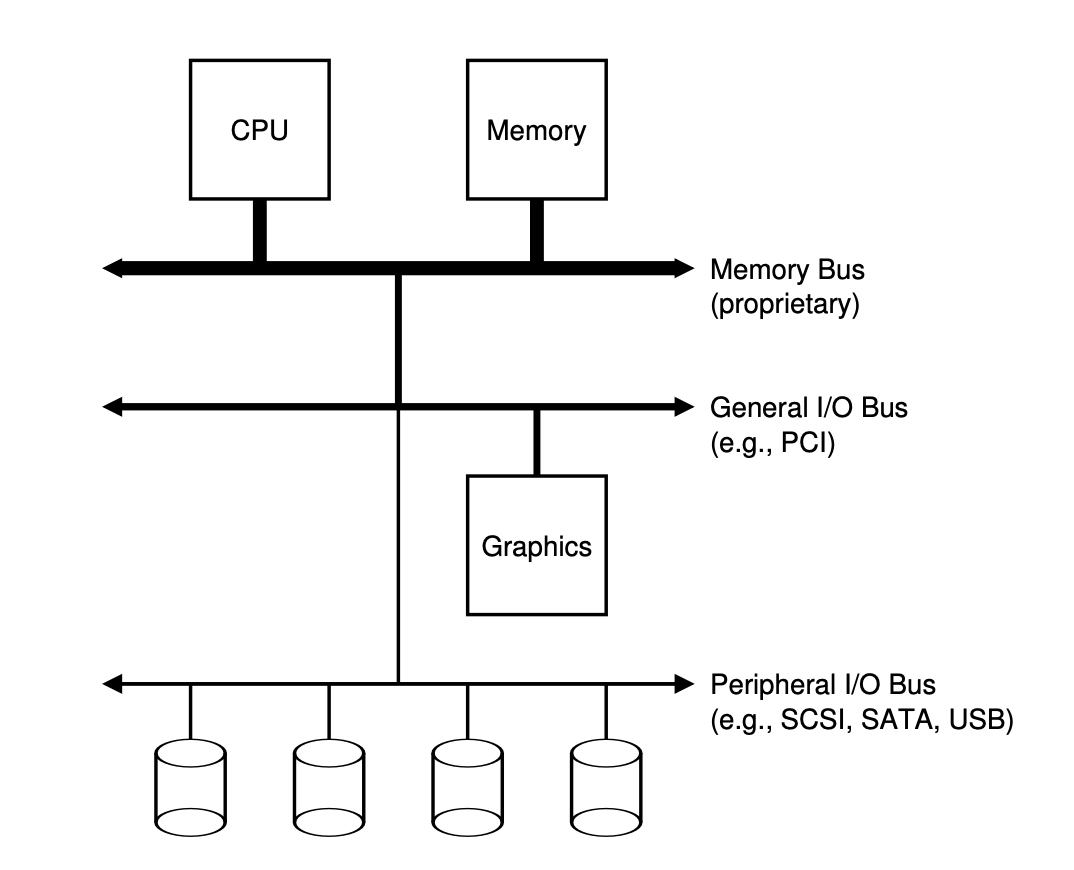
<h3 id="일반적인-시스템의-고전적-구조"><strong>일반적인 시스템의 고전적 구조</strong></h3>

<p><img src="/assets/images/image.png" alt="alt text" /></p>

<ul>
  <li>CPU와 주메모리가 메모리 버스로 연결되어 있다.</li>
  <li>몇 가지 장치들이 범용 I/O 버스에 연결이 되어 있는데, 많은 현대의 시스템에서는 PCI를 사용하고 있다.</li>
  <li>
    <p>아래에는 주변장치용 버스가 있다(SCSI, SATA, USB).</p>
  </li>
  <li>계층 구조가 필요한 이유: 물리적인 이유와 비용</li>
  <li>버스가 고속화되려면 더 짧아져야 하는데, 그런 고속 메모리 버스에는 여러 장치들을 수용할 공간이 없다.</li>
  <li>
    <p>고속의 성능을 내는 버스를 만드는 기술은 비싸다.</p>
  </li>
  <li>고성능 장치들을 CPU에 가깝게 배치, 느린 성능의 장치들은 멀리 배치</li>
  <li>디스크처럼 느린 장치를 주변 장치 I/O 버스에 연결하여 얻는 이득: 많은 장치들을 연결할 수 있다.</li>
</ul>

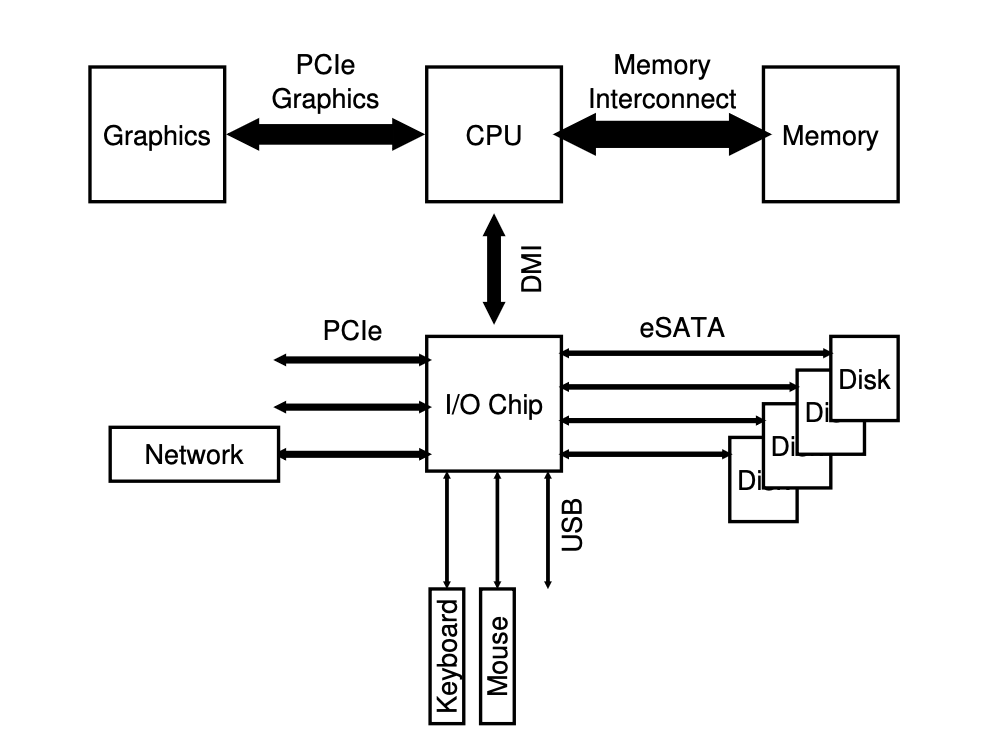
<h3 id="현대식-시스템-구조"><strong>현대식 시스템 구조</strong></h3>

<p><img src="/assets/images/image2.png" alt="alt text" /></p>

<ul>
  <li>CPU는 인텔의 <strong>DMI(Direct Media Interface)</strong> 기술을 통해 I/O 칩에 연결되어 있다.</li>
  <li>
    <p>나머지 장치들이 이 칩에 여러 다른 종류의 연결 방식을 사용하여 연결된다.</p>
  </li>
  <li>하나 또는 그 이상의 하드 디스크들이 <strong>eSATA(external SATA)</strong> 방식으로 시스템에 연결되어 있다.</li>
  <li>I/O 칩 아래 쪽으로는 여러 개의 <strong>USB(Universal Serial Bus)</strong> 인터페이스가 있다.</li>
  <li>느린 성능의 장치들을 연결하기 위해 USB가 사용된다.</li>
  <li>시스템에 또 다른 고성능의 장치들을 연결할 수 있도록 <strong>PCIe</strong>가 있다.</li>
  <li>PCIe: Peripheral Component Interconnect Express</li>
  <li>고속의 저장 장치(<strong>NVMe</strong> 등)이 주로 여기에 연결이 된다.</li>
</ul>

<h1 id="362-표준-장치">36.2 <strong>표준 장치</strong></h1>

<ul>
  <li>두 개의 중요한 요소: 하드웨어 인터페이스와 내부 구조</li>
</ul>

<p><strong>하드웨어 인터페이스</strong></p>

<ul>
  <li>인터페이스를 제공하여 시스템 소프트웨어가 동작을 제어할 수 있도록 해야 한다.</li>
  <li>모든 하드웨어 장치들은 특정한 상호 동작을 위한 방식과 명시적인 인터페이스를 갖고 있다.</li>
</ul>

<p><strong>내부 구조</strong></p>

<h1 id="363-표준-방식">36.3 <strong>표준 방식</strong></h1>

<ul>
  <li>
    <p>인터페이스: 세 개의 레지스터로 구성되어 있다.</p>
  </li>
  <li><strong>상태 레지스터</strong>: 장치의 현재 상태를 읽을 수 있다.</li>
  <li><strong>명령어 레지스터</strong>: 장치가 특정 동작을 수행하도록 요청할 때 사용한다.</li>
  <li><strong>데이터 레지스터</strong>: 장치에 데이터를 보내거나 받거나 할 때 사용한다.</li>
</ul>

<hr />

<p><br /></p>

<p><strong>장치가 운영체제를 대신하여 특정 동작을 할 때에 운영체제와 장치 간에 일어날 수 있는 상호 동작의 과정</strong></p>

<div class="language-plaintext highlighter-rouge"><div class="highlight"><pre class="highlight"><code>While (STATUS == BUSY)
    ; // 장치가 바쁜 상태가 아닐 때까지 대기

데이터를 DATA 레지스터에 쓰기
명령어를 COMMAND 레지스터에 쓰기
    (그러면 장치가 명령어를 실행한다)

While (STATUS == BUSY)
    ; // 요청을 처리하여 완료할 때까지 대기
</code></pre></div></div>

<p><br /></p>

<ol>
  <li>
    <p><strong>먼저 반복적으로 장치의 상태 레지스터를 읽어서 명령어 수신 가능 여부를 확인한다.</strong></p>

    <ul>
      <li>이 동작을 장치에 대해 <strong>폴링(polling)</strong>한다고 표현한다.</li>
      <li>기본적으로 어떤 작업을 하고 있는지 묻는 것과 같다.</li>
    </ul>
  </li>
</ol>

<p><br /></p>

<ol>
  <li>
    <p><strong>운영체제가 데이터 레지스터에 어떤 데이터를 전달한다.</strong></p>

    <ul>
      <li>데이터 전송에 메인 CPU가 관여하는 경우를 <strong>programmed I/O</strong>라고 부른다.</li>
    </ul>
  </li>
</ol>

<p><br /></p>

<ol>
  <li>
    <p><strong>운영체제가 명령 레지스터에 명령어를 기록한다.</strong></p>

    <ul>
      <li>명령 레지스터에 명령어가 기록되면 데이터는 이미 준비되었다고 판단하고 명령어를 처리한다.</li>
    </ul>
  </li>
</ol>

<p><br /></p>

<ol>
  <li>
    <p><strong>마지막으로 운영체제는 디바이스가 처리를 완료했는지를 확인하는 폴링 반복문을 돌면서 기다린다.</strong></p>

    <ul>
      <li>성공과 실패를 알리는 에러 코드를 받게 된다.</li>
    </ul>
  </li>
</ol>

<hr />

<p><br /></p>

<p>이 방식은 매우 비효율적이다(매우 비효율적인 폴링을 사용한다). 다른 프로세스에게 CPU를 양도하지 않고, 장치의 동작이 완료되기 전까지 계속 루프를 돌면서 장치상태를 체크한다(= 폴링). 입출력 장치는 매우 느리며, CPU는 시간을 많이 소모하게 된다.</p>

<hr />

<p><br /></p>

<p><strong>핵심 질문: 폴링 사용 비용을 어떻게 피하는가</strong></p>

<p>어떻게 하면 자주 폴링을 하지 않으면서 운영체제가 장치의 상태를 확인할 수 있고, 장치를 관리하는 CPU의 오버헤드를 줄일 수 있을까?</p>

<h1 id="364-인터럽트를-이용한-cpu-오버헤드-개선"><strong>36.4 인터럽트를 이용한 CPU 오버헤드 개선</strong></h1>

<h1 id="365-dma를-이용한-효율적인-데이터-이동"><strong>36.5 DMA를 이용한 효율적인 데이터 이동</strong></h1>

<h1 id="366-디바이스와-상호작용하는-방법"><strong>36.6 디바이스와 상호작용하는 방법</strong></h1>

<h1 id="367-운영체제에-연결하기-디바이스-드라이버"><strong>36.7 운영체제에 연결하기: 디바이스 드라이버</strong></h1>

<h1 id="368-사례-연구-간단한-ide-디스크-드라이버"><strong>36.8 사례 연구: 간단한 IDE 디스크 드라이버</strong></h1>]]></content><author><name></name></author><category term="ostep" /><summary type="html"><![CDATA[CRUX: HOW TO INTEGRATE I/O INTO SYSTEMS]]></summary></entry><entry><title type="html">[OSTEP] Persistence</title><link href="/ostep/2026/02/07/Persistence.html" rel="alternate" type="text/html" title="[OSTEP] Persistence" /><published>2026-02-07T00:00:00+09:00</published><updated>2026-02-07T00:00:00+09:00</updated><id>/ostep/2026/02/07/Persistence</id><content type="html" xml:base="/ostep/2026/02/07/Persistence.html"><![CDATA[<h1 id="index">Index</h1>

<ul>
  <li>
    <ol>
      <li>I/O Devices</li>
    </ol>
  </li>
  <li>
    <ol>
      <li>Hard Disk Drives</li>
    </ol>
  </li>
  <li>
    <ol>
      <li>Redundant Disk Arrays (RAID)</li>
    </ol>
  </li>
  <li>
    <ol>
      <li>Files and Directories</li>
    </ol>
  </li>
  <li>
    <ol>
      <li>File System Implementation</li>
    </ol>
  </li>
  <li>
    <ol>
      <li>Fast File System (FFS)</li>
    </ol>
  </li>
  <li>
    <ol>
      <li>FSCK and Journaling</li>
    </ol>
  </li>
  <li>
    <ol>
      <li>Log-structured File System (LFS)</li>
    </ol>
  </li>
  <li>
    <ol>
      <li>Flash-based SSDs</li>
    </ol>
  </li>
  <li>
    <ol>
      <li>Data Integrity and Protection</li>
    </ol>
  </li>
</ul>]]></content><author><name></name></author><category term="ostep" /><summary type="html"><![CDATA[Index]]></summary></entry><entry><title type="html">Goodbye 2025!</title><link href="/2025/12/31/goodbye-2025.html" rel="alternate" type="text/html" title="Goodbye 2025!" /><published>2025-12-31T00:00:00+09:00</published><updated>2025-12-31T00:00:00+09:00</updated><id>/2025/12/31/goodbye-2025</id><content type="html" xml:base="/2025/12/31/goodbye-2025.html"><![CDATA[<div class="language-c highlighter-rouge"><div class="highlight"><pre class="highlight"><code><span class="cp">#include</span> <span class="cpf">&lt;stdio.h&gt;</span><span class="cp">
</span>
<span class="kt">int</span> <span class="nf">main</span><span class="p">()</span> <span class="p">{</span>
  <span class="n">printf</span><span class="p">(</span><span class="s">"Hello 2026!"</span><span class="p">);</span>
  <span class="k">return</span> <span class="mi">0</span><span class="p">;</span>
<span class="p">}</span>
</code></pre></div></div>]]></content><author><name></name></author><summary type="html"><![CDATA[```c #include]]></summary></entry><entry><title type="html">Welcome to Jekyll!</title><link href="/jekyll/update/2025/12/30/welcome-to-jekyll.html" rel="alternate" type="text/html" title="Welcome to Jekyll!" /><published>2025-12-30T21:20:39+09:00</published><updated>2025-12-30T21:20:39+09:00</updated><id>/jekyll/update/2025/12/30/welcome-to-jekyll</id><content type="html" xml:base="/jekyll/update/2025/12/30/welcome-to-jekyll.html"><![CDATA[<p>You’ll find this post in your <code class="language-plaintext highlighter-rouge">_posts</code> directory. Go ahead and edit it and re-build the site to see your changes. You can rebuild the site in many different ways, but the most common way is to run <code class="language-plaintext highlighter-rouge">jekyll serve</code>, which launches a web server and auto-regenerates your site when a file is updated.</p>

<p>Jekyll requires blog post files to be named according to the following format:</p>

<p><code class="language-plaintext highlighter-rouge">YEAR-MONTH-DAY-title.MARKUP</code></p>

<p>Where <code class="language-plaintext highlighter-rouge">YEAR</code> is a four-digit number, <code class="language-plaintext highlighter-rouge">MONTH</code> and <code class="language-plaintext highlighter-rouge">DAY</code> are both two-digit numbers, and <code class="language-plaintext highlighter-rouge">MARKUP</code> is the file extension representing the format used in the file. After that, include the necessary front matter. Take a look at the source for this post to get an idea about how it works.</p>

<p>Jekyll also offers powerful support for code snippets:</p>

<figure class="highlight"><pre><code class="language-ruby" data-lang="ruby"><span class="k">def</span> <span class="nf">print_hi</span><span class="p">(</span><span class="nb">name</span><span class="p">)</span>
  <span class="nb">puts</span> <span class="s2">"Hi, </span><span class="si">#{</span><span class="nb">name</span><span class="si">}</span><span class="s2">"</span>
<span class="k">end</span>
<span class="n">print_hi</span><span class="p">(</span><span class="s1">'Tom'</span><span class="p">)</span>
<span class="c1">#=&gt; prints 'Hi, Tom' to STDOUT.</span></code></pre></figure>

<p>Check out the <a href="https://jekyllrb.com/docs/home">Jekyll docs</a> for more info on how to get the most out of Jekyll. File all bugs/feature requests at <a href="https://github.com/jekyll/jekyll">Jekyll’s GitHub repo</a>. If you have questions, you can ask them on <a href="https://talk.jekyllrb.com/">Jekyll Talk</a>.</p>]]></content><author><name></name></author><category term="jekyll" /><category term="update" /><summary type="html"><![CDATA[You’ll find this post in your _posts directory. Go ahead and edit it and re-build the site to see your changes. You can rebuild the site in many different ways, but the most common way is to run jekyll serve, which launches a web server and auto-regenerates your site when a file is updated.]]></summary></entry><entry><title type="html">Hello World: My First Jekyll Post</title><link href="/test/welcome/2025/12/30/my-first-post.html" rel="alternate" type="text/html" title="Hello World: My First Jekyll Post" /><published>2025-12-30T00:00:00+09:00</published><updated>2025-12-30T00:00:00+09:00</updated><id>/test/welcome/2025/12/30/my-first-post</id><content type="html" xml:base="/test/welcome/2025/12/30/my-first-post.html"><![CDATA[<h1 id="welcome-to-my-blog">Welcome to My Blog</h1>

<p>This is a test post to verify the Jekyll setup on my MacBook.
Everything including Ruby 4.0 configuration and GitHub Actions is working fine!</p>

<h2 id="why-jekyll">Why Jekyll?</h2>

<ul>
  <li>Simple and powerful</li>
  <li>Built with Ruby</li>
  <li>Free hosting via GitHub Pages</li>
</ul>

<p>Happy blogging!</p>]]></content><author><name></name></author><category term="test" /><category term="welcome" /><summary type="html"><![CDATA[Welcome to My Blog]]></summary></entry></feed>